Support work is reactive: something arrives, you deal with it. Plenty of customer work isn't. Onboarding a new account, chasing a renewal or qualifying a lead has stages, and it stalls quietly when nobody is looking. A pipeline is a board for that work.
You'll find it under Pipelines in the left sidebar. Pipelines are in beta and are part of the Administrator and Manager roles; agents don't see them. A pipeline is listed only for the people it's shared with. To show it to your whole team, switch on Visible to all users in its settings.
A pipeline holds either companies or contacts that already exist in Gleap. You choose which when you create it. You don't invent free-standing deal records.
That's an advantage where it fits. A company on your onboarding board is the same company whose conversations are in your inbox, so you see the support history and the onboarding stage in one place.
It's a limit where it doesn't. A record sits on a pipeline once, so if you need several open opportunities against one company at the same time, a pipeline isn't the right shape.
Each pipeline can carry its own fields, such as a deal value or a seat count. A field either lives On the entry, so the value belongs to this pipeline only, or reads the company's or contact's own attribute, so the board shows what the record already knows. Number fields can be totalled per stage.
Every entry can also have a Due date, and on company pipelines an Owner, which is the company's own owner.
Onboarding: from signed to live, with the stages your implementation really has.
Renewals: a contract coming up is visible months before it lapses.
Sales: from lead to won or lost, with a deal value per entry.
Anything with an owner and a next step, which support queues handle badly.
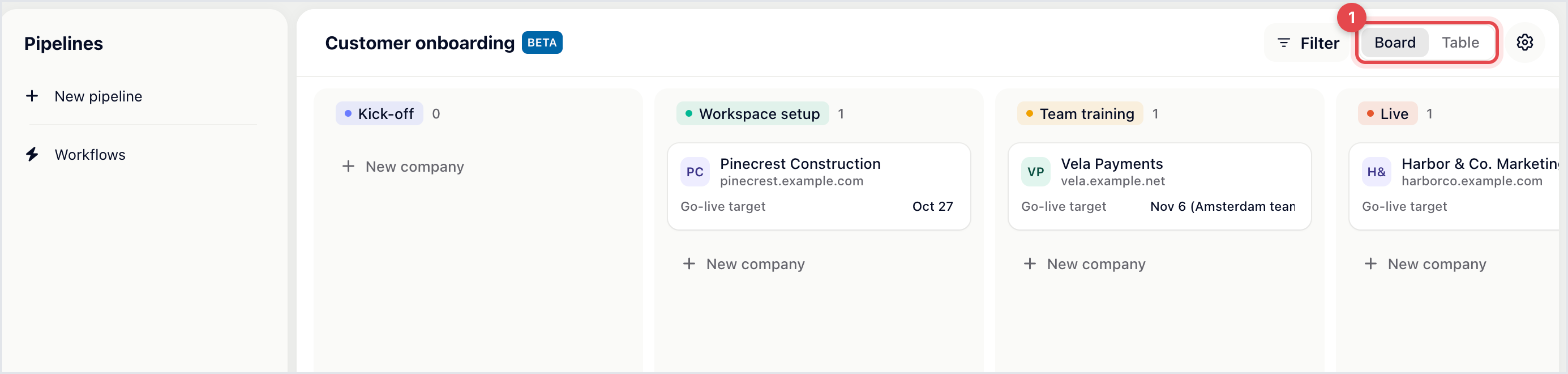
The same pipeline shows as a Board, with one column per stage, or as a Table, with one row per entry. The board is for moving things along. The table is for reading across everything at once.
A ticket is a conversation that ends. A pipeline entry is a relationship that continues. Running onboarding as a ticket means either closing it before the work is done or leaving it open for weeks, and both distort what your inbox tells you.
The two still work together: you can link a ticket to an entry, and a pipeline automation can raise a ticket for you.

