You don't have to leave a conversation to get AI help on it. The ticket sidebar has a Kai Copilot tab next to Details, where you can ask for a draft, a summary or a lookup with the whole thread already in front of it.
In the Inbox, open the conversation.
In the ticket sidebar, click the Kai Copilot tab. Press D to switch between Details and Kai Copilot.
Type your request in the Ask Kai Copilot… box at the bottom and send it. Kai Copilot answers in the tab.
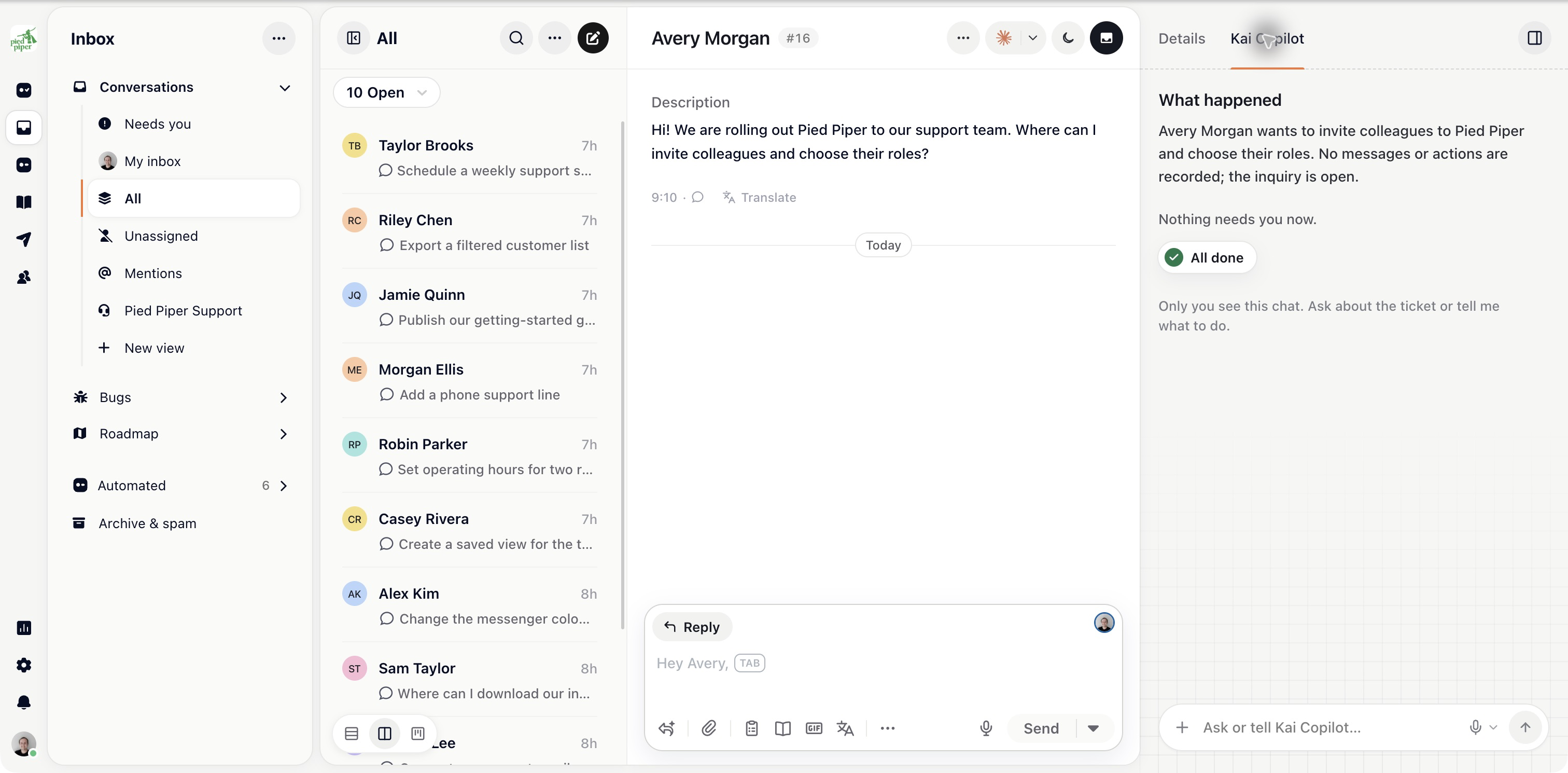
You always talk to Kai Copilot here, whoever is working on the ticket. You can't pick another agent in this tab. To shape its answers, open Kai Copilot → Settings and add your own instructions, tools and skills.

Drafting a reply you then edit, which is faster than starting from an empty box on a long thread.
Getting a summary of a long thread before you answer.
Looking something up in a system Kai Copilot has a tool for, without switching tabs.
Starting Kai Code on a bug report, so the thread carries the finding.
Ask for a draft and Kai Copilot shows it on a card under the chat. Press Send to send it in your name, the pen to edit it first, or X to dismiss it. Where you see a Draft reply button, it puts the draft straight into your reply box instead. Kai Copilot only drafts when you ask.
Read it before sending. A draft is confident by construction; whether it's right depends on the content it drew on, and you're the one who knows this customer.
Your custom agents don't chat in this tab, but they can work on a ticket. Ask Kai Copilot to hand it over, for example “Hand this to Billing helper”. This works for live agents you are allowed to use, and you can undo it. The agent then works on the ticket itself, so use it for a job you want the agent to take over, not for a quick question.
It works the other way round too. An agent that hits something it can't decide stops and asks. The Kai Copilot tab then shows a count. The ticket is marked unread until someone answers, and the unified inbox lists it under Needs you. A run waiting on a question is a customer waiting too, so check unread tickets daily if you run agents.
Kai Copilot also has its own place in the main navigation. Use its chat for work across Gleap; use the ticket’s Kai Copilot tab when the request is about that conversation. Get started with Kai Copilot explains its chats, routines and artifacts.

