Kai Copilot’s roadmap settings control what happens to a new feature request. Open Kai Copilot → Settings → Roadmap & changelog → Feature requests.
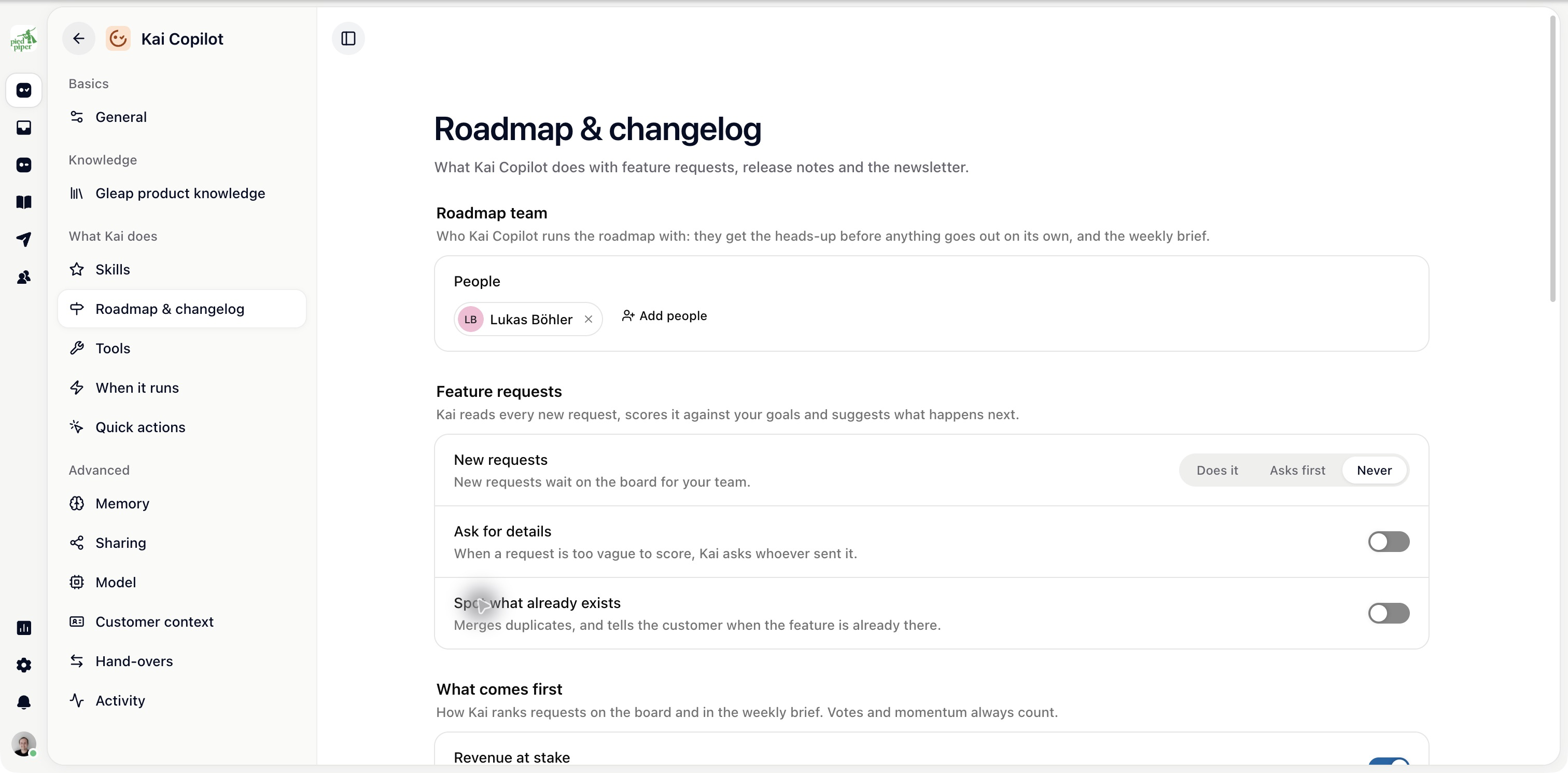
New requests has three modes. Asks first prepares a proposal in Needs you, Does it allows automatic decisions and replies within the rules, and Never leaves requests for your team.
This mode is separate from the two information-gathering switches below.
Turn on Ask for details when Kai should ask the person who submitted a vague request for the information needed to assess it.
Useful questions clarify the problem, who it affects and what the person is trying to accomplish. Check the first conversations to make sure Kai is asking for useful context rather than repeating what the customer already wrote.
Spot what already exists enables duplicate and existing-feature handling. Kai can recognise a matching request or tell the customer when the capability is already available.
The quality of that check depends on current knowledge and the code or tools Kai can access. Keep sources up to date and connect the evidence needed to explain the product accurately.
Open the request under Inbox → Roadmap and review its conversation, votes, status and any proposed decision. Follow the associated chat or Needs you item when an action is waiting for your team.
When a match is wrong, correct the request and the customer reply, then improve the source or instructions that caused it. Merging or moving requests should preserve the customer need, not merely group similar words.