Open Kai Copilot → Settings → Roadmap & changelog. The New requests setting under Feature requests replaces the former Let Kai decide switch in Kai PM.
Find Feature requests → New requests.
Choose Asks first, Does it or Never.
Review Ask for details and Spot what already exists.
Check the first new requests and their customer replies.
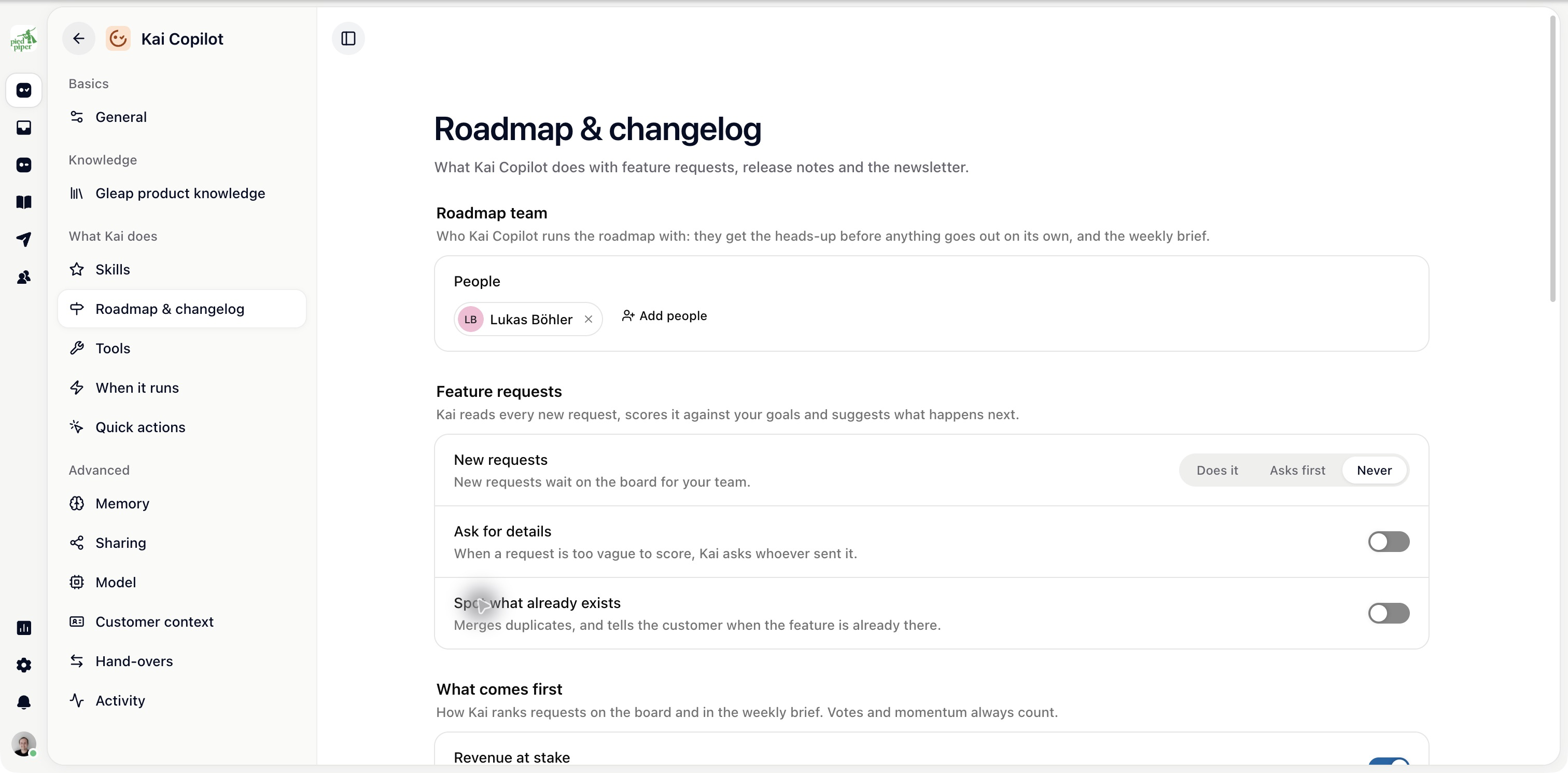
Changes on this settings page save as you change them.
Kai suggests accepting, declining or merging a request and prepares a reply for the person who asked. The proposal waits in Needs you.
Read the underlying request and the customer-facing wording before approving. A proposal is not a promise already sent to the customer.
Kai decides and replies within its rules. A request it is not sure about comes to your team.
Use this only after reviewing how your goals, company profile and connected evidence shape its decisions. It can produce real changes and customer messages.
New requests wait on the board for your team. Open Inbox → Roadmap to review and move them manually. You can still ask Kai Copilot to help in a chat.
Open the request, check its current status and update it to the intended state. If a customer received an incorrect reply, correct that in the conversation as well. Changing a board status does not erase a message already sent.
Review whether the problem came from missing request details, the company profile, goals or duplicate handling before switching automatic decisions back on.