Gleap’s bill has a fixed plan subscription and usage charges for the AI work you run. Current Kai Support and Kai Copilot usage is paid from your AI balance. The pricing page has the current rates; Billing shows the terms and charges for your workspace.
Four plans, each including everything in the plan before it.
Plan | Price | What it adds |
|---|---|---|
Starter | $29 a month billed yearly, $35 monthly | One seat and one project: the messenger, live chat and the inbox, in-app bug reporting with console logs, Kai Support and Kai Copilot. |
Team | $149 a month billed yearly, $179 monthly | Unlimited seats and projects, every channel and integration, the help center, roadmap and custom domain, replays, surveys, newsletters and tours, the API, webhooks and MCP, and every Kai agent: Kai Support investigations, Kai Code, Kai Copilot’s roadmap work and custom agents. |
Pro | $299 a month billed yearly, $359 monthly | A choice of AI models, advanced reports, custom roles, SLA policies, keeping archived tickets forever, the SOC 2 report, higher limits, priority support and the first phone number included. On yearly billing, a $500 AI credit every year. |
Enterprise | from $999 a month billed yearly | Single sign-on, invoice billing, bring your own model, a dedicated success manager and a custom SLA. |
Prices show in your currency at checkout. Yearly billing gets you two months free. From Team upwards there are no per-seat fees, so adding a colleague doesn't change the bill.
Every plan's checkout starts with a 7-day free trial, as long as your workspace hasn't had one. You add a card when you start it, so your workspace keeps running when the trial ends.
Days 1 to 7: everything on your plan is on, and nothing is charged.
Not live by day 6? Gleap adds 7 more days, once, and moves your first payment back with them.
Day 8: the first payment. Paddle, our payment partner, emails you a reminder before it.
Changed your mind? Cancel in Billing before the trial ends and you pay nothing.
During the trial, Kai Support can answer up to 50 conversations at no charge. Other AI features available on your plan use your workspace’s Trial credit. The amount and any setup rewards are shown in the dashboard and Billing. Top-ups become available once you subscribe.
You can look around before you pick a plan. Until your trial starts, your workspace is in setup mode: you can set up your project, style the messenger and add sources for Kai Support, but nothing reaches your customers. The messenger stays off in your app until your trial starts.
If you cancel your trial or a cancelled plan reaches its end date, your workspace becomes read-only. A failed payment doesn't do that: your plan keeps working for 7 days while you update the card, then runs as a limited plan until the payment goes through.
Nothing is deleted. Tickets, contacts and settings are kept, and you can still read them.
Nothing reaches your customers. The messenger turns off in your app, Kai Support stops answering, no new conversations come in and no emails go out.
Pick a plan to turn it back on. Everything comes back right away, exactly as you left it.
Change plan, invoices and cancellation shows how.
Early-stage startups may get 50% off Team or Pro for the first 12 months. Check if you qualify.
Kai Support and Kai Copilot are available from Starter and are billed by AI usage on current terms. Investigations, Kai Code and custom agents are available from Team. Kai Copilot’s roadmap and changelog work also needs Team. Costs depend on the work and model; a resolution-cost estimate is not a fixed per-resolution charge.
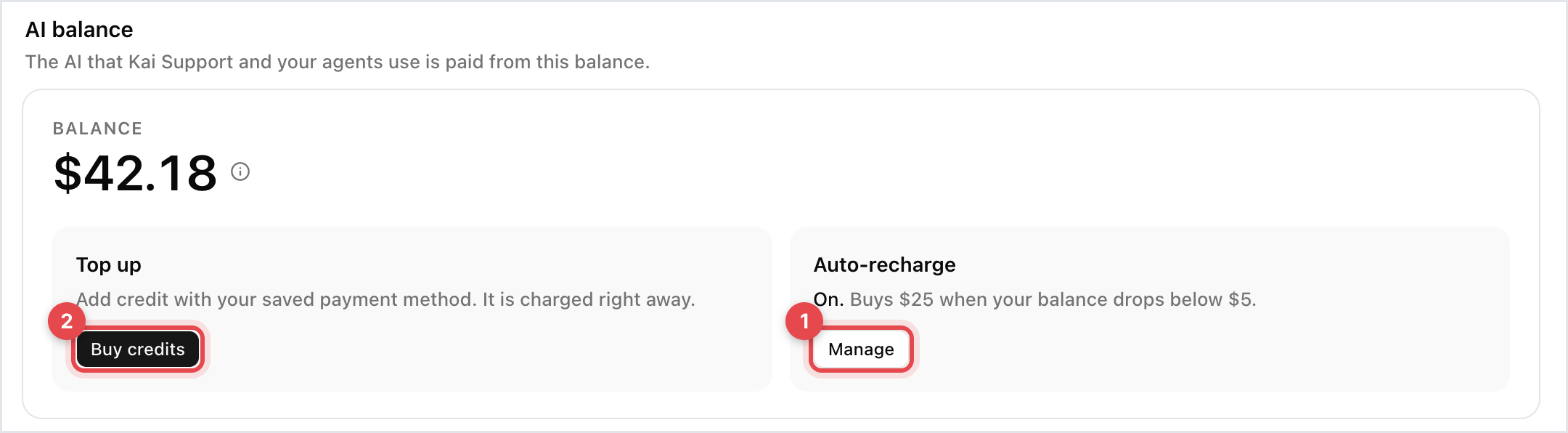
The billing page shows the balance, what's been used, and a breakdown you can export as CSV. That breakdown is the thing to look at when a month is more expensive than expected: it shows which AI services the spend came from.
Some older workspaces still pay $0.29 (€0.29, £0.25) per Kai Support resolution. For those terms, the conversation must meet the resolution criteria, including the 72-hour handover window. Charges are reserved while the outcome is checked. Check Billing to see whether your workspace uses AI usage, per-resolution or older included-AI terms.
A quiet month costs less than a busy one. AI spend follows conversation volume.
The model matters. A larger model on every conversation costs more than one chosen for the job, which is what automatic model selection is for.
You can add credits at any time. Better, turn on Auto-recharge: set a threshold and an amount, and Gleap buys more when the balance drops below it.

Workspaces on older, usage-billed plans have an AI usage limit instead of a balance. It caps what can be spent in a month, so a misconfigured automation or a sudden spike can't produce a surprise. If you're hitting it legitimately, raise it with Update usage limit on the same page. Current plans pay from the AI balance and have no usage limit.
Most overspend comes from the same places: an AI agent answering things a help center article would have handled, a model heavier than the task needs, or automations doing AI work on tickets nobody reads. The usage breakdown tells you which it is faster than any amount of guessing.
Kai Voice on current Team and higher plans supports live calls in the widget and on phone lines. It is billed by usage. Phone numbers and external forwarding can have additional rates, shown under Settings → Phone. A project’s monthly voice limit controls usage; it does not buy minutes. See Let customers call Kai Voice from the widget.
