Everyone in your organisation has a role, and the role decides what they see and what they can change. The three built-in roles work on every plan. Building your own roles needs the Pro plan or higher. To invite people and change someone's role, see Invite your team and set roles.
The roles are cumulative: each has everything of the one before, plus more.
Area | Agent | Manager | Administrator |
|---|---|---|---|
Inbox, boards, contacts, tags, running workflows, using AI agents | Yes | Yes | Yes |
Building workflows and AI agents, help center, outbound, surveys, tours, reports, project settings, teams, pipelines, Kai Code, Kai Copilot | No | Yes | Yes |
Billing, roles and permissions, SSO, organisation settings | No | No | Yes |
Every ticket board, including boards limited to specific people | No | No | Yes |
Only two things separate Manager from Administrator: organisation management and access to every board. That makes Manager the right role for most people who run the product, and Administrator something to keep to a handful.
open your profile menu (your avatar), choose Organizations, then Roles & permissions.
Click Create role.
Give the role a Name, such as "Support lead".
Pick the permission groups it carries. Always include Core: it holds the basic permissions everyone needs, and the editor doesn't add it for you.
Click Create role.
The role now appears in the list next to the built-in ones, and you assign it the same way you assign a built-in role.
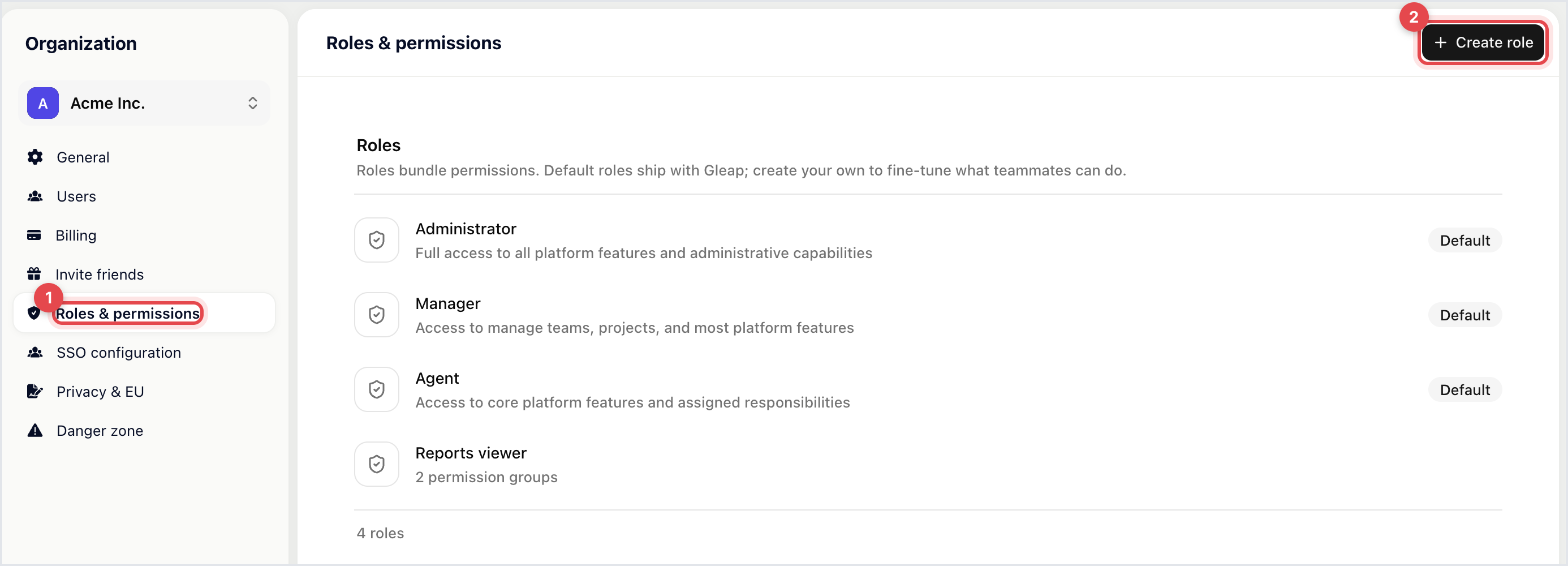
Roles are built from permission groups rather than individual switches, in these areas: Core, Tickets, Workflow, AI agent, Reports, Help center, Contacts, Pipelines, Outreach, Project settings, Organization and Kai Code. Many areas offer a view group and a manage group, so "can see reports, can't change anything" is a role you can build in a minute, useful for a stakeholder who wants numbers without touching the product.

Ticket boards have their own access control, which can limit a board to specific people, and assignment decides who works what. A role says which parts of Gleap someone can use; those two say which work they see inside it.
Start people at the lowest role that lets them do the job and promote them when they hit a wall. It's a friendlier conversation than the one after someone deletes a workflow, and it costs nothing to reverse.
Review the list occasionally. Roles accumulate quietly: people move teams, contractors finish, and nobody demotes anyone.

