Kai Support resolutions and the work of Kai Resolve, Kai Code, Kai PM and custom agents are paid from your organisation's AI balance. You top it up by buying credits, and auto-recharge buys more for you before it runs out. Billing is for members with permission to manage the organisation.
Click your avatar at the bottom of the left-hand bar, choose Organizations and open Billing.
In AI balance, click Buy credits under Top up.
Pick an Amount: $25, $50, $100, $250, $500 or $1,000.
Check the price and taxes, then click Purchase.
Your saved payment method is charged right away. You see "Payment submitted. Your credits appear shortly." and the Balance goes up a moment later.
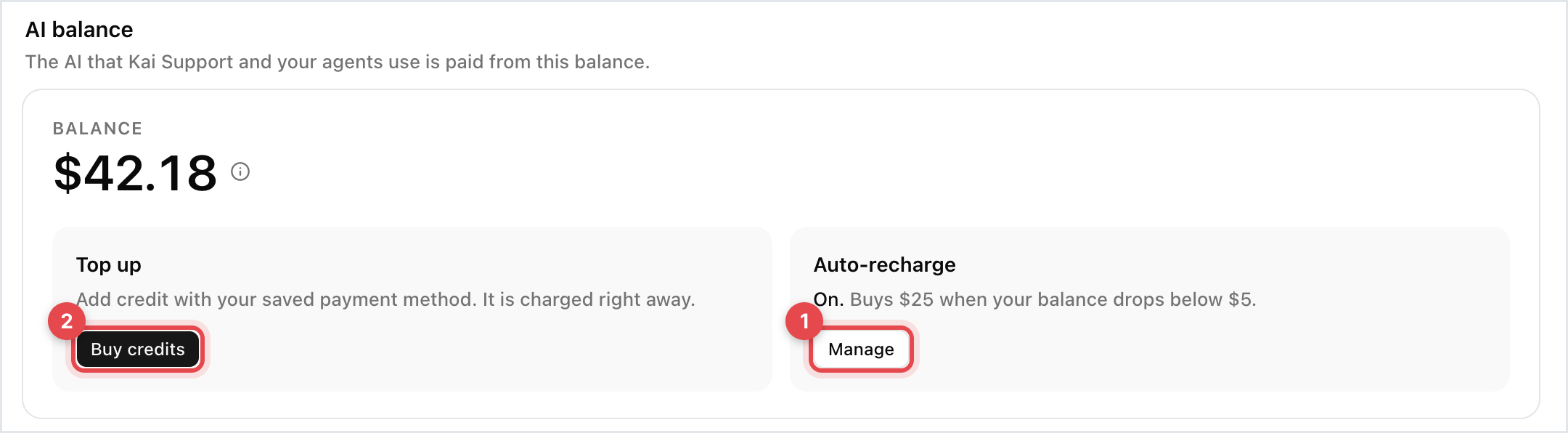
In AI balance, click Manage next to Auto-recharge.
Turn on Enable auto-recharge.
Set When credits are below, for example $5, and Purchase this amount, for example $25. The first amount has to be lower than the second.
Click Save.
The tile now reads "On. Buys" the amount "when your balance drops below" your threshold. Auto-recharge is switched on for you with your first card checkout, at $25 below $5, so check it fits your volume.

You can't buy credits during the 7-day trial: the tile says "Top-ups open when you subscribe".
Kai Support is included in the trial, for up to 50 conversations.
Kai Resolve, Kai Code, Kai PM and custom agents run on a Trial credit of up to $50. When it's used up, they pause until your paid plan starts.
Credit you haven't used stays in your balance when the trial turns into a plan.
Yearly AI credit: Pro on yearly billing includes $500 of AI credit with each yearly payment. It expires at the next renewal.
Reserved: money held for Kai Support resolutions that are still being confirmed.
Credits you earn by inviting another team are added to the same balance.
If a payment failed, top-ups are paused until you pay the open invoice.

