Kai helps rank requests on Inbox → Roadmap and in the roadmap brief. Configure the context under Kai Copilot → Settings → Roadmap & changelog → What comes first.
The old Kai PM scoring pages are no longer a separate area of the navigation.
Votes and momentum count in prioritisation. They show how many people want a change and whether interest is increasing.
Your goals give Kai strategic context. A request that helps a goal can rank higher than one with similar demand that does not.
Revenue at stake weights requests using the monthly revenue associated with the customers asking, when enabled and available. The settings page shows the revenue source when one is known.
Company profile tells Kai what you sell, who it is for and the competitive context. Outdated goals or a vague profile produce less useful rankings.
Open the request and check its description, votes, customer context and the reasons available with its assessment. A high score is a reason to inspect a request, not an automatic promise to build it.
Technical estimates depend on the evidence and code Kai can access. A short request and an unconnected repository leave less information to estimate from.
Open Roadmap & changelog in Kai Copilot’s settings.
Review Revenue at stake.
Add or remove Your goals.
Open Company profile and correct what has changed.
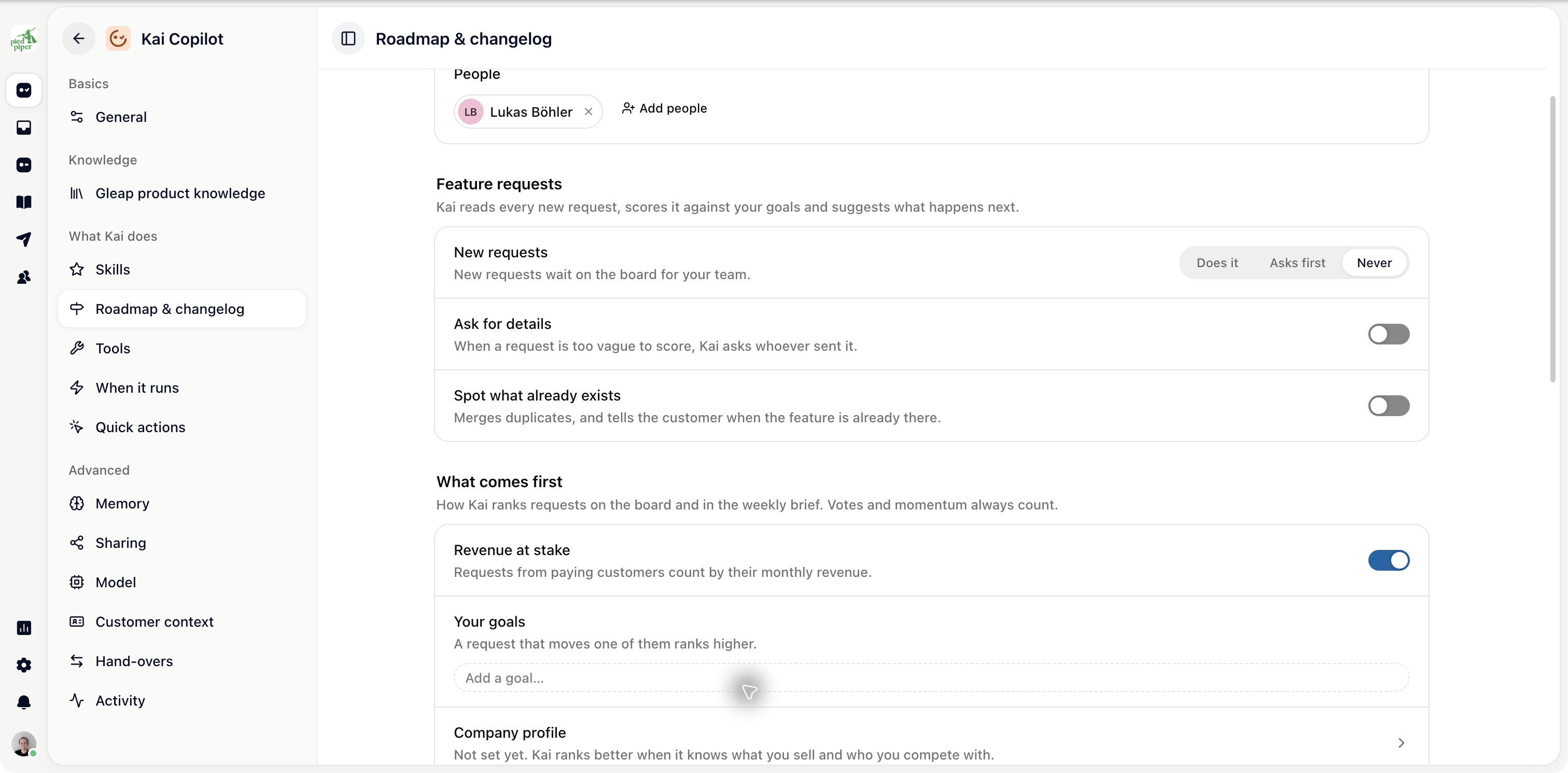
The current page exposes these priorities together. Use it rather than looking for the former standalone Scoring settings page.

