Your team answers good questions well every day in the inbox, where the AI can't see them. Learning from solved conversations turns those answers into snippets, so the next customer gets the answer straight away. Nobody has to sit down and write documentation. It's available on the Team plan and up.
Open Knowledge → Improve.
Under Learning, set Learn from solved conversations:
Auto-apply. Kai publishes snippets for questions your bot couldn't answer. Each one is logged and can be reverted in Activity. Changes to your own snippets, and anything about pricing, policy or security, wait for your approval.
Review first. Kai proposes new snippets and snippet fixes. Nothing goes live until you approve it.
Off. Kai doesn't learn from closed conversations.
New projects start on Auto-apply. Older projects that never picked a mode stay Off until someone does.
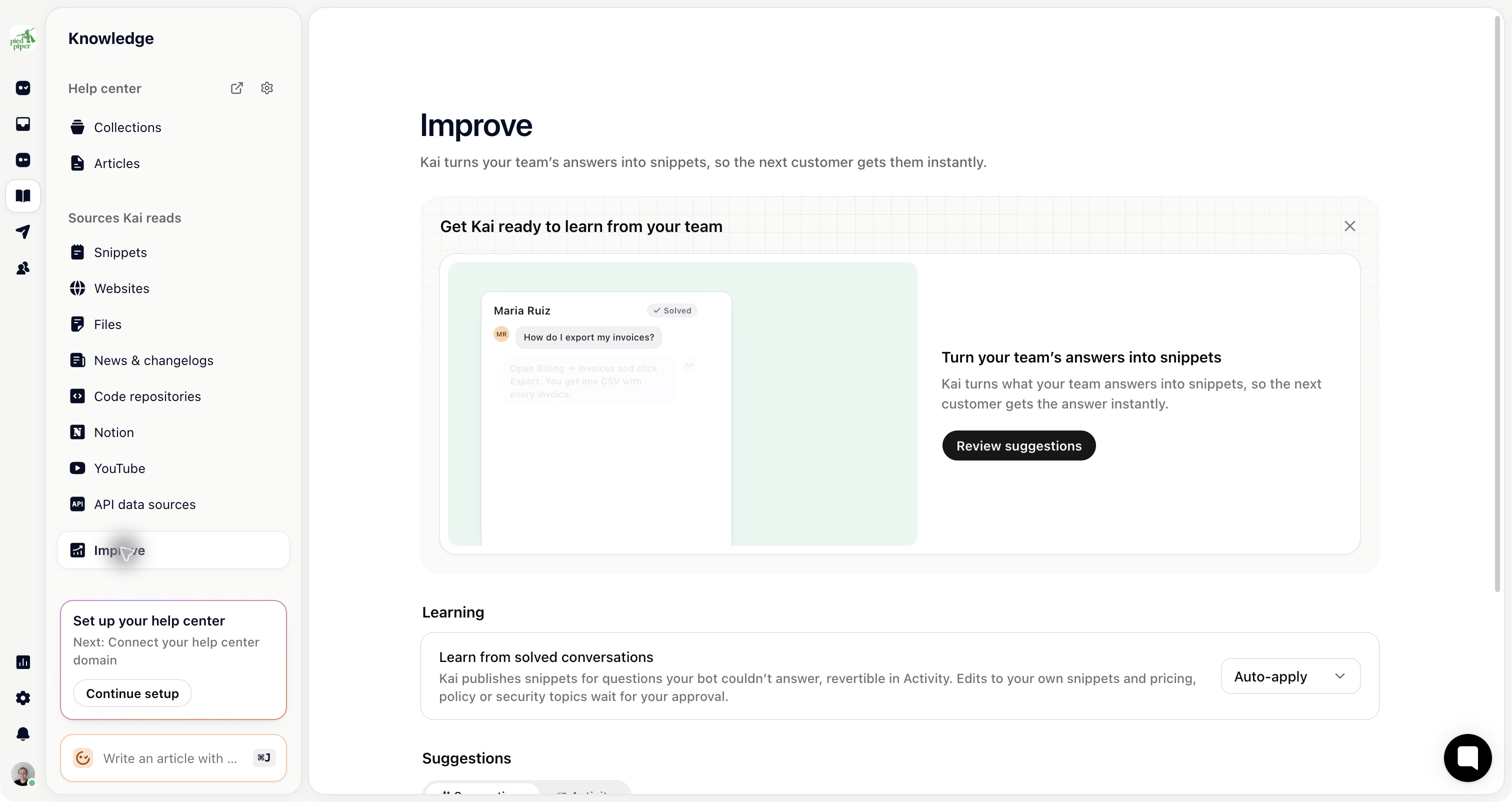
About a day after a ticket is closed, Kai reads the conversation and looks for knowledge that would help other customers: the general fact behind the case, not the specifics of that one customer. Most tickets produce nothing, and that's expected. If the ticket is reopened first, it's skipped.
Kai only learns from conversations where a person contributed: a teammate's reply, a substantial internal note, or a teammate's answer to a question from Kai Support investigations. Conversations the bot handled alone, and tickets that closed automatically, are skipped on purpose. A knowledge base that learns from its own output drifts, and grows more confident about whatever it got wrong first. Feature requests and crash reports are skipped too.
Two kinds of change: a New snippet, or a Snippet update to one you already have. Kai never writes or edits help articles. When a conversation shows that an article is outdated, Kai learns the correction as a snippet and notes the outdated article in Activity as an Insight, so you can fix the article yourself.
Open the Suggestions tab. Each suggestion shows what it proposes and the ticket it came from.
Choose Edit to change the wording, then Save & approve. Or choose Approve as it is.
To reject one, choose Dismiss and pick a reason under Why dismiss?: Not useful, Incorrect, Duplicate or Contains sensitive data.
Editing before you approve is worth the few extra seconds. An answer written to one customer often carries their circumstances, and generalising the wording is exactly what makes it reusable.
Auto-apply is stricter than it sounds. A snippet only goes live without you when all of this is true:
It's a new snippet, or an update to a snippet Kai learned itself.
Kai is highly confident and found no personal data in it.
It isn't about pricing or billing, legal matters or policy, security, or something the product can't do.
The answer has some substance (at least 60 characters).
It fills a proven gap: the bot had no answer or a wrong or incomplete one, or the same question came up in more than one ticket.
Everything else waits on the Suggestions tab, even with Auto-apply on.

The AI agents overview also shows a Learned this week card with what Kai picked up recently. Read Activity now and then for the first few weeks.
What you're offered depends on how your team writes in the inbox. A reply that explains the rule, such as "exports only include the columns visible in your current view", becomes reusable knowledge. "Fixed it for you, try again now" has nothing anyone else can use. If the queue stays empty, that's usually why, and it's a better thing to work on than any setting on this page.

